How to Pay NBI Clearance Online 2026: All Payment Methods (Complete Guide)
Quick Answer:
1. Go to the official National Bureau of Investigation clearance website.
2. Log in, fill out the form, and set your appointment.
3. Choose a payment method and pay.
Payment options: GCash, Maya, Online Banking, Credit/Debit Card, 7-Eleven (CliQQ), Bayad Center, ECPay.
Fee is around ₱155 (including service fee). Save your reference number after payment.
Paying your NBI Clearance online in 2026 is simple, fast, and secure. The National Bureau of Investigation allows applicants to book appointments and pay through multiple digital and over-the-counter payment channels.
This complete guide explains all NBI payment methods, step-by-step instructions, fees, troubleshooting tips, and FAQs.
Payment Methods Comparison
Which Payment Method Should You Use?
When paying your clearance through the official National Bureau of Investigation system, choose the method that fits your situation:
Choose GCash or Maya If:
- You have a digital wallet account
- You want instant payment (24/7)
- You prefer paying from home
- You’re okay with ₱155 total fee
Choose 7-Eleven or Bayad Center If:
- You prefer cash payment
- You want to save around ₱10–15
- There’s a branch near you
- You want a physical receipt
Choose Online Banking If:
- You have online banking access
- You trust bank-level security
- You’re familiar with bills payment
Before You Pay: What You Need
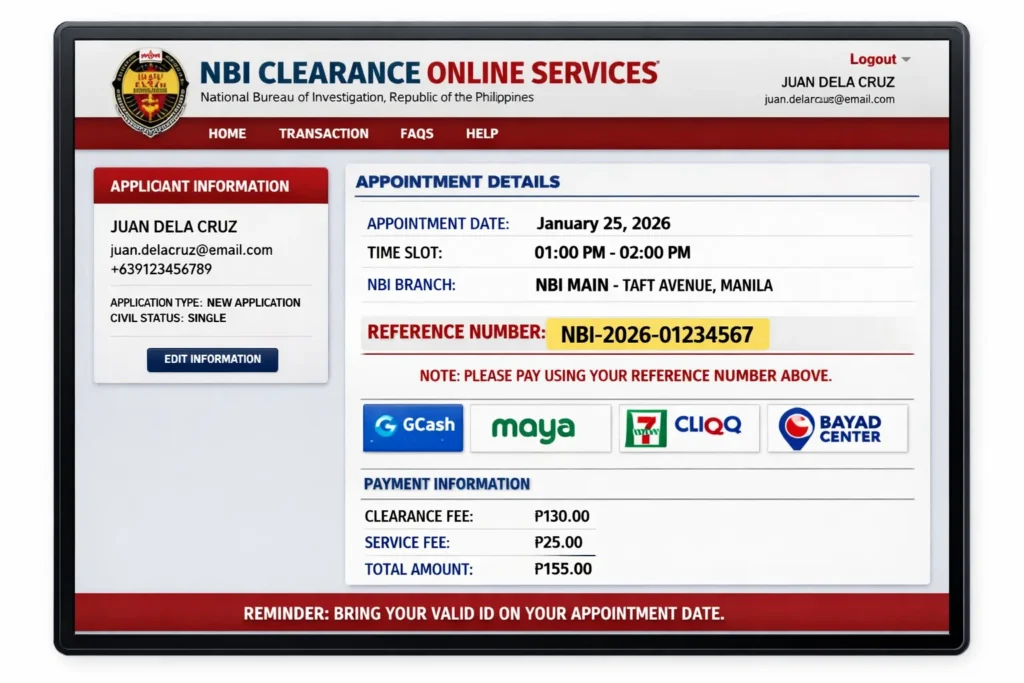
1. NBI Reference Number
You’ll get NBI Reference Number after completing your online appointment.
Example format: NBI-2026-02190001
⚠ You cannot pay without this number.
2. Payment Amount
- ₱155 (GCash, Maya, Online Banking)
- ₱140–145 (7-Eleven cash option may vary)
Bring exact amount or a little extra.
3. Account Balance or Cash
- Digital payment → Make sure you have enough balance
- Cash payment → Bring around ₱150–160
⚠ Important Reminder
Complete your online appointment first on the official NBI Clearance website before paying. The system will generate your reference number, which is required for all payment methods.
Step-by-Step: How to Pay NBI Clearance Online (2026)
Log in to the official National Bureau of Investigation clearance website, complete your appointment details, and get your reference number.
Choose your preferred payment method (GCash, Maya, Online Banking, or 7-Eleven) and pay using the reference number to confirm your booking.
Method 1: How to Pay via GCash (₱155)
Quick Steps:
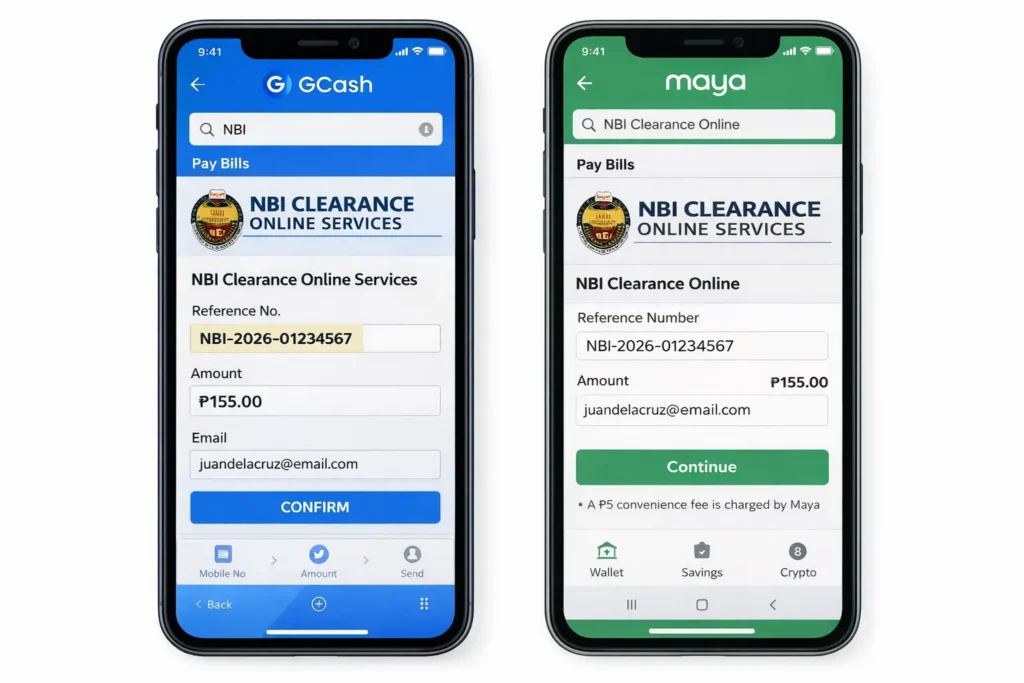
- Open GCash app
- Tap “Pay Bills”
- Search “NBI Clearance”
- Enter reference number
- Pay ₱155
- Screenshot receipt
Detailed Guide:
Step 1: Open GCash App
- Launch GCash on your phone
- Log in using your MPIN
- Ensure you have at least ₱155 balance
Step 2: Navigate to Pay Bills
- On home screen, tap “Pay Bills”
- Or: Menu → Pay Bills
Step 3: Find NBI Clearance
- Tap search bar
- Type “NBI” or “NBI Clearance”
- Select “NBI Clearance” from results
Step 4: Enter Details
- Field 1: Your NBI reference number (copy-paste to avoid errors)
- Field 2: Amount: ₱155
- Verify details are correct
Step 5: Confirm Payment
- Tap “Next” or “Continue”
- Enter your GCash MPIN
- Tap “Confirm”
Step 6: Save Receipt
- Take screenshot immediately
- Tap “Download Receipt” (if available)
- Email receipt to yourself as backup
Payment Reflects: Within 5-30 minutes in NBI portal
See full guide: [How to Pay NBI via GCash (Detailed) →]
Method 2: How to Pay via Maya/PayMaya (₱155)
Process is identical to GCash:
- Open Maya app → Log in
- Tap “Pay Bills”
- Search “NBI Clearance”
- Enter reference number
- Pay ₱155
- Save receipt
Advantages:
- Same instant processing as GCash
- Available 24/7
- Digital receipt
Disadvantages:
- Same ₱25 service fee (₱155 total)
- Requires Maya account
Method 3: How to Pay via Online Banking (₱150-160)
Supported Banks:
- BDO Online Banking
- BPI Online
- Unionbank Online
- Metrobank Online
- Security Bank
- Most major Philippine banks
General Steps (varies by bank):
Step 1: Log in to Online Banking
- Go to your bank’s website or app
- Enter username and password
- Complete security verification
Step 2: Go to Bills Payment
- Find “Pay Bills” or “Bills Payment” section
- May be under “Payments” or “Transactions”
Step 3: Add NBI as Biller
- Search for “NBI Clearance” or “National Bureau Investigation”
- Click “Add Biller” or similar
- Save as favorite (for future use)
Step 4: Enter Payment Details
- Reference Number: Your NBI reference number
- Amount: ₱150-160 (varies by bank)
- Verify information
Step 5: Confirm Payment
- Enter OTP (one-time password from SMS)
- Or: Use security token
- Confirm transaction
Step 6: Save Confirmation
- Download transaction receipt
- Note transaction reference number
- Screenshot for backup
Payment Reflects: Usually instant, may take up to 24 hours
Method 4: How to Pay at 7-Eleven (₱140-145 Cash)
Cheapest option with physical receipt!
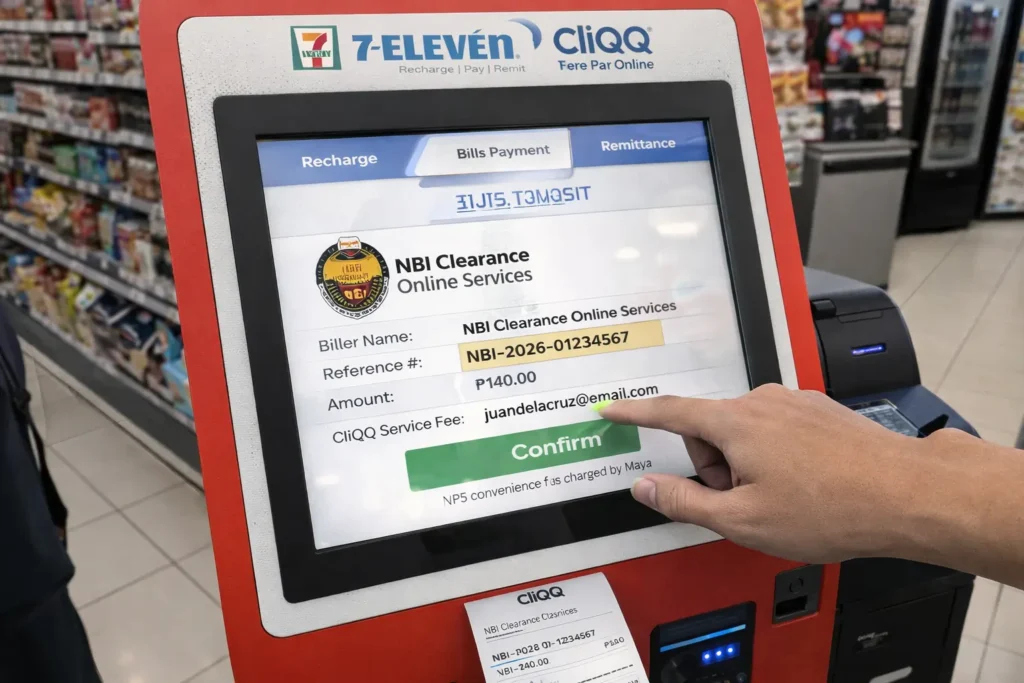
Steps:
Step 1: Prepare
- Have your NBI reference number ready
- Bring ₱150 cash (for change)
- Go to any 7-Eleven branch nationwide
Step 2: Approach Cashier
- Say: “NBI Clearance payment po”
- Or: “Bills payment – NBI”
Step 3: Provide Reference Number
- Tell cashier your reference number
- Or: Show email on phone
- Cashier enters into system
Step 4: Verify Amount
- Cashier will confirm: ₱140-145
- Amount varies slightly by branch
- Most charge ₱140
Step 5: Pay Cash
- Hand cash to cashier
- Receive change if applicable
Step 6: Get Receipt
- Cashier prints official receipt
- Keep this receipt!
- Bring to NBI appointment
Advantages:
- Cheapest method (save ₱10-15 vs GCash)
- Physical receipt
- Available 24/7 (most stores)
- No need for bank account or digital wallet
Disadvantages:
- Must visit physical store
- Cash only (no cards)
See full guide: [How to Pay NBI at 7-Eleven (Detailed) →]
Method 5: How to Pay at Bayad Center (₱140-150)
It is ismilar to 7-Eleven.
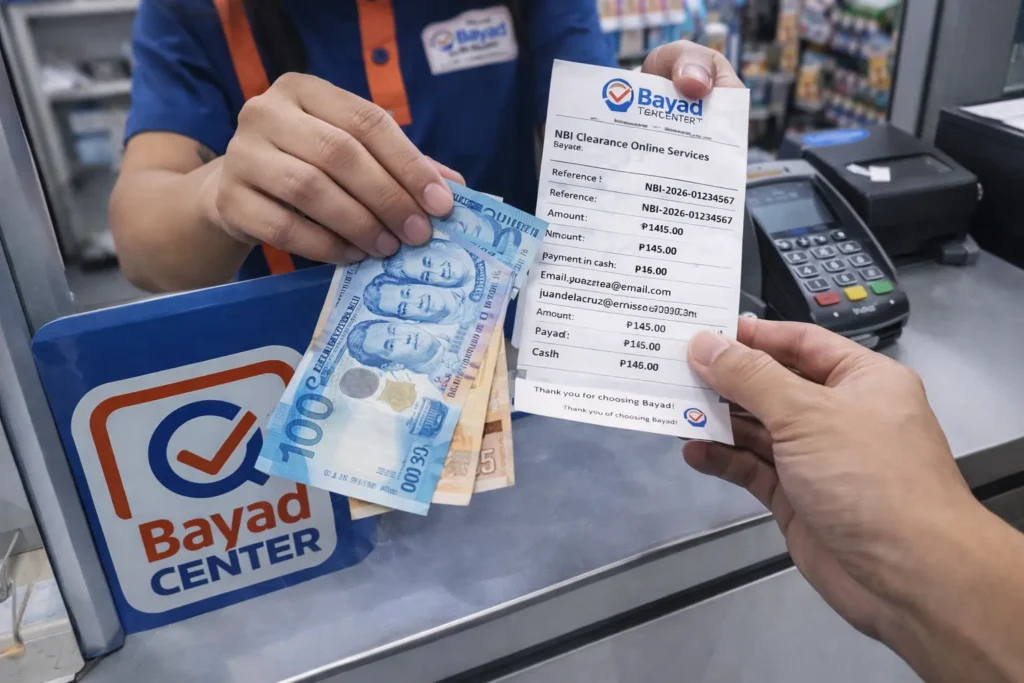
Where to Find Bayad Center:
- SM malls
- Robinsons malls
- Standalone Bayad centers
Steps:
- Go to Bayad Center counter
- Tell staff: “NBI Clearance payment”
- Provide reference number
- Pay ₱140-150 cash
- Receive and keep receipt
Operating Hours: Usually 10 AM – 7 PM (mall hours)
How to Verify Your Payment Was Successful?
Check NBI Portal (15-30 Minutes After Payment):
Step 1: Visit NBI Website
- Go to https://clearance.nbi.gov.ph
- Click “Sign In”
Step 2: Log In
- Enter your email and password
- Complete verification
Step 3: Check Status
- Go to “My Applications” or “Transactions”
- Look at payment status
- Should show: “PAID” or “Payment Received”
If Shows “PAID”:
- Payment successful!
- Your appointment is confirmed
- You’re good to go
If Still Shows “PENDING”:
- ⏳ Wait 24 hours (rare delays happen)
- Keep your receipt
- Check again tomorrow
If Not Reflected After 24 Hours:
- Email: clearance@nbi.gov.ph
- Attach receipt
- Include: Full name, reference number
- Wait for response (2-3 days)
Common Payment Problems & Solutions
Here are the most common issues when paying through the National Bureau of Investigation clearance system and how to fix them:
Problem 1: “Reference Number Not Found”
Causes:
- Typo in reference number
- Haven’t completed online appointment
- Appointment not yet confirmed
Solutions:
- Double-check reference number (copy-paste don’t type)
- Verify appointment was submitted (check email)
- Wait 1 hour after appointment booking, try again
- Try different payment method
Problem 2: “Payment Successful But Not Reflecting in NBI Portal”
What to Do:
- Wait 24 hours (processing delay)
- Keep your payment receipt (screenshot or printed)
- Log in to NBI portal after 24 hours
- If still not reflected:
- Email clearance@nbi.gov.ph
- Attach receipt
- Include full name and reference number
Important: Do NOT pay again until confirmed first payment failed!
Problem 3: “Insufficient Balance” (GCash/Maya)
Solutions:
- Cash in to your digital wallet first
- Transfer from bank to GCash/Maya
- Ask someone to send you money
- Use different payment method (7-Eleven)
Problem 4: “System Error” or “Transaction Failed”
Possible Causes:
- Poor internet connection
- Server maintenance
- Payment gateway down
Solutions:
- Check internet connection
- Close and reopen app
- Try again after 5-10 minutes
- Try different payment method
- Use 7-Eleven as backup
Problem 5: “Lost Payment Receipt”
For Digital Payments (GCash/Maya):
- Check transaction history in app
- Screenshot from transaction history
- Use that as proof
For Cash Payments (7-Eleven):
- Return to same branch
- Request duplicate receipt
- Bring valid ID
- Provide date and approximate time
Backup:
- If NBI portal shows “PAID”, you’re okay
- Screenshot portal status
- Bring that to appointment
Payment Timing: When Should You Pay?
Best Practice:
- Pay within 24 hours of booking appointment
- Secures your slot
- Ensures payment reflects in system
- Less stress
Deadline:
- Must pay at least 24-48 hours before appointment
- Some branches require 48 hours
- Don’t wait until last minute
Can Pay Appointment Day?
- Technically yes, but NOT recommended
- If payment doesn’t reflect, appointment forfeited
- Play it safe: pay at least 1-2 days early
Cost Comparison Summary
All-In Costs:
| Method | Base Fee | Service Fee | Total | Payment Type |
|---|---|---|---|---|
| GCash | ₱130 | ₱25 | ₱155 | Digital |
| Maya | ₱130 | ₱25 | ₱155 | Digital |
| Online Banking | ₱130 | ₱20-30 | ₱150-160 | Digital |
| 7-Eleven | ₱130 | ₱10-15 | ₱140-145 | Cash |
| Bayad Center | ₱130 | ₱10-20 | ₱140-150 | Cash |
Savings:
- Using 7-Eleven vs GCash: Save ₱10-15
- Using Bayad vs GCash: Save ₱5-15
Note: NBI direct payment at branch is ₱130 (no service fee) but you must pay on appointment day.
Frequently Asked Questions
Can I pay for someone else’s NBI clearance?
Yes. Payment is linked to reference number, not the person paying. You can use your GCash to pay for your friend’s/family member’s NBI clearance as long as you have their reference number.
Which payment method is fastest?
GCash and Maya are fastest – instant payment, reflects in 5-30 minutes. Online banking can take up to 24 hours. 7-Eleven is also instant.
Can I pay before booking an appointment?
No. You must book appointment first to get reference number. Then use that reference number to pay.
What if I paid the wrong amount?
Contact NBI immediately via email or phone. Bring receipt to appointment and explain. You may need to pay the difference.
Can I get a refund if I cancel my appointment?
Generally no. NBI fees are non-refundable once paid. Only refund if there was system error (double payment) or NBI cancels all appointments.
Do I need to print the payment receipt?
Not required but recommended. You can show digital receipt (screenshot) on phone, but printed copy is safer backup.
Can I use credit card?
Only if your bank’s online banking supports credit card bills payment. Otherwise, use debit or cash methods.
What if GCash/Maya system is down?
Use alternative method: online banking or 7-Eleven (cash). Always have backup payment option ready.
Summary: Choose Your Payment Method
For Convenience: GCash or Maya (instant, 24/7, from home) – ₱155
For Savings: 7-Eleven or Bayad (₱10-15 cheaper) – ₱140-145
For Security: Online Banking (bank-backed) – ₱150-160
All methods are equally valid – choose based on your preference and what’s most convenient for you!
Most Popular: GCash (fastest, most convenient, used by majority)